Module - 4 PHP Programing
2026-09-08 11:53
Tags: #ADET
Author: Duke Hsu
Topic
- PHP
- PHP Syntax
- PHP Frameworks
1. PHP
PHP is a server-side scripting language , commonly used to create dynamic and interactive websites.
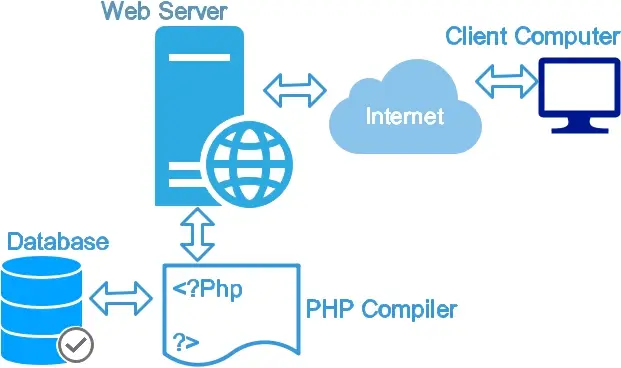
- Hypertext Preprocessor
- Runs mainly on the web server
- Generates dynamic HTML Content
- Works well with databases such as MySQL
- Open source server-side scripting language
- File extension
.php
1.1 What Can PHP Do?
- PHP can generate dynamic page content
- PHP can create, open, read, write, delete, and close files on the server
- PHP can collect form data
- PHP can send and receive cookies
- PHP can add, delete, modify data in your database
- PHP can be used to control user-access
- PHP can encrypt data
With PHP you are not limited to output HTML. You can output images or PDF files. You can also output any text, such as XHTML and XML.
2. PHP Syntax
A PHP script start with <?php and ends with ?>
1 2 3 | |
2.1. Comments in PHP
Single-line comments
1 2 3 4 5 6 7 8 | |
2.2 Variables
-
Variables are "containers" for storing information
-
A variable can have a short name (like
$xand$y) or a more descriptive name ($age,$name)
Rules for PHP variables :
- must start with the
$sign - must start with a letter or the underscore character
- variable name cannot start with a number
- variable name can only contain alpha-numeric characters and underscores (A-z, 0-9, and _ )
- case-sensitive (
$ageand$AGEare two different variables)
1 2 3 4 5 6 7 | |
2.3 Data Types
Variables can store data of different types, and different data types can do different things.
PHP supports the following data types:
- string(text value)
- int(whole numbers)
- float(decimal numbers)
- bool(true of false)
- array(multiple values)
- object(stores data as objects)
- null(empty variable)
- resource(reference external resources)
1 2 3 4 5 6 7 8 9 10 11 12 13 | |
2.4 Operators
Operators are special symbols used to perform operations on variables and values.
PHP Arithmetic Operators
The arithmetic operators are used with numeric values to perform common mathematical operations, such as addition, subtraction, multiplication etc.
| Operator | Name | Example | Result |
|---|---|---|---|
| + | Addition | $x + $y | Sum of $x and $y |
| - | Subtraction | $x - $y | Difference of $x and $y |
| * | Multiplication | $x * $y | Product of $x and $y |
| / | Division | $x / $y | Quotient of $x and $y |
| % | Modulus | $x % $y | Remainder of $x divided by $y |
| ** | Exponentiation | $x ** $y | Result of raising $x to the $y'th power |
| #### PHP Assignment Operators |
The assignment operators are used with numeric values to assign values to variables.
| Assignment | Same as... | Description |
|---|---|---|
| $x = $y | $x = $y | Assign (the left operand is set to the value of the expression on the right) |
| $x += $y | $x = $x + $y | Add and assign |
| $x -= $y | $x = $x - $y | Subtract and assign |
| $x *= $y | $x = $x * $y | Multiply and assign |
| $x /= $y | $x = $x / $y | Divide and assign |
| $x %= $y | $x = $x % $y | Modulus and assign |
PHP Comparison Operators
The comparison operators are used to compare two values (number or string) and return a boolean result.
| Operator | Name | Example | Result |
|---|---|---|---|
| == | Equal | $x == $y | Returns true if $x is equal to $y |
| === | Identical | $x === $y | Returns true if $x is equal to $y, and they are of the same type |
| != | Not equal | $x != $y | Returns true if $x is not equal to $y |
| <> | Not equal | $x <> $y | Returns true if $x is not equal to $y |
| !== | Not identical | $x !== $y | Returns true if $x is not equal to $y, or they are not of the same type |
| > | Greater than | $x > $y | Returns true if $x is greater than $y |
| < | Less than | $x < $y | Returns true if $x is less than $y |
| >= | Greater than or equal to | $x >= $y | Returns true if $x is greater than or equal to $y |
| <= | Less than or equal to | $x <= $y | Returns true if $x is less than or equal to $y |
| <=> | Spaceship | $x <=> $y | Returns an integer less than, equal to, or greater than zero, depending on if $x is less than, equal to, or greater than $y. Introduced in PHP 7. |
PHP Increment / Decrement Operators
The increment/decrement operators are used to increment or decrement a variable's value by one.
| Operator | Same as... | Description |
|---|---|---|
| ++$x | Pre-increment | Increments $x by one, then returns $x |
| $x++ | Post-increment | Returns $x, then increments $x by one |
| --$x | Pre-decrement | Decrements $x by one, then returns $x |
| $x-- | Post-decrement | Returns $x, then decrements $x by one |
PHP Logical Operators
The logical operators are used to combine conditional statements and return a boolean result.
| Operator | Name | Example | Result |
|---|---|---|---|
| and | And | $x and $y | True if both $x and $y are true |
| or | Or | $x or $y | True if either $x or $y is true |
| xor | Xor | $x xor $y | True if either $x or $y is true, but not both |
| && | And | $x && $y | True if both $x and $y are true |
| | | Or | $x | $y | True if either $x or $y is true |
| ! | Not | !$x | True if $x is not true |
more : https://www.w3schools.com/php/php_operators.asp
2.5. Condition if / else
The if / else statement executes some code if a condition is true and another code if that condition is false.
Syntax 1
1 2 3 4 5 6 7 8 9 10 11 | |
Syntax 2 if / elseif / else
1 2 3 4 5 6 7 8 9 10 11 | |
2.6 Switch
The switch statement is used to perform different actions based on different conditions.
Use the switch statement to select one of many blocks of code to be executed
1 2 3 4 5 6 7 8 9 10 11 12 13 14 15 16 17 | |
This is how it works:
- The expression is evaluated once
- The value of the expression is compared with the values of each case
- If there is a match, the associated block of code is executed
- The break keyword breaks out of the switch block
- The default code block is executed if there is no match
2.7 Loops
PHP loops are used to execute the same block of code again and again, as long as a certain condition is true.
In PHP, we have the following loop types:
- while - loops through a block of code as long as the specified condition is true
- do...while - loops through a block of code once, and then repeats the loop as long as the specified condition is true
- for - loops through a block of code a specified number of times
- foreach - loops through a block of code for each element in an array
2.8 Functions
- Reusable blocks of code
- Can receive parameters
- Can return a value
- Improve organization and reduce repetition
1 2 3 4 | |
Parameters
1 2 3 4 5 6 7 8 9 | |
2.9 Error Handling
Error handling in PHP is simple. An error message with filename, line number and a message describing the error is sent to the browser.
1 2 3 4 5 6 7 8 9 10 11 12 | |
Output
Error: [8] Undefined variable: test
2.10 PHP Form Handling
The PHP superglobals $_GET and $_POST are used to collect form-data
HTML file
1 2 3 4 5 6 7 8 9 10 11 | |
PHP file
1 2 3 4 5 6 7 8 | |
3.0 PHP Frameworks
PHP frameworks are pre-built collections of libraries, components, and tools that help developers build web applications more quickly , securely, and efficiently.
Most major PHP frameworks rely on the Model-View-Controller(MVC) architecture, which separates your application's data(Model), user interface(View), and background logic(Controller) to keep code clean and organized
3.1 PHP with HTML Form Workflow
- User fills out form
- Browser submits data
- PHP receives input
- PHP validates data
- PHP process data
- Database stores data
- HTML / Browser returns a result
3.2 PHP Framework
The Top PHP Frameworks
| Framework | Best For | Market Share / Standing | Core Strengths |
|---|---|---|---|
| Laravel | Rapid development, startups, and general web apps | ~44.6% (Market Leader) | Extremely developer-friendly, huge ecosystem (Laracasts), elegant syntax, and automated tooling (Artisan CLI). |
| Symfony | Large-scale, complex enterprise applications | ~10% | High performance, deeply modular, reusable components used by other software like Drupal and Composer. |
| CodeIgniter | Beginners and lightweight, fast deployment | ~6% | Remarkably small footprint (~2MB installation), minimal configuration required, and excellent speed out of the box. |
| Yii (Yii2) | High-performance and secure data-heavy apps | ~14.1% | Built-in Gii code generator, strong security features (RBAC), and excellent caching tools. |
| Laminas (Zend) | Enterprise-level and object-oriented systems | ~12.4% | Strict adherence to PHP standards (PHP-FIG), corporate-friendly, highly secure, and deeply customizable. |