Module - 7 Introduction Laravel
2026-10-08 16:29
Tags: #ADET
Author: Duke Hsu
Topic
- Laravel Framework
- Laravel Directory Structure (Project Structure)
- Model - View - Controller
- Routing
- Laravel Framework Installation
- Composer and
php artisan Command
env file
1. Laravel Framework
Laravel is an open-source PHP web application framework. It provides structure, tools, and conventions that make building modern web applications faster, cleaner, and more maintainable.
Developer: Taylor Otwell
Release: June 2011
Stable release: 13.35.0, Oct 6 2026
Type: Web Framework
License: MIT License
Website: laravel.com
Repository: github.com/laravel/framework
1.1 Advantages of Web Framework
- Efficiency and Speed
- Security
- Code Reusability and Organization
- Community and Support
- Testing and Debugging
1.2 Disadvantages of Web Framework
- Steep Learning Curve
- Lack of Flexibility
- Bloat and Performance Overhead
- Dependency and Lock-in
- Difficult in Debugging Internal Code
2. Laravel Project Structure ( Directory Structure)
-
app/
Application Logical (Models, Controllers)
-
routes/
URL route definitions
-
resources/
Views(Blade) & frontend assets
-
config/
Configuration files
-
database/
Migrations, seeders, factories
-
public/
Public entry point & assets
-
storage/
Logs, cache, generated files
-
vendor/
Composer dependencies
More details plz visit: https://laravel.com/framework/docs/structure
tree command
tree -d ./laravel-app
2.1 Request Flow in Laravel

- Browser - User requests GET
/home
- Route - Matches the URL pattern
- Controller - Runs the business logic
- View - Builds the HTML page
- Browser - Displays the final result
3. MVC Architecture
| Role |
Responsibility |
Real-life Example — Restaurant |
| Model |
Stores, reads, and writes data |
Warehouse staff who manage and store ingredients |
| Controller |
Receives requests, makes decisions, and returns results |
A waiter who takes orders, sends them to the kitchen, and serves the food |
| View |
Displays information to the user |
The plated dish presented to the customer |
MVC separates an application into three parts so code is easier to understand, test, and maintain.
a. MODEL
Data & Rules
- Handles database and business logic
- Product model
b. VIEW
User Interface
- What the user sees
- Blade templates
c. CONTROLLER
Requests Logic
- Receives request and decides action
- ProductController
Controllers organize request-handling logic. Instead of putting all code in routes, we group related actions inside controller classes.
Generate
| php artisan make:controller ProductController
|
Add Method
| public function index() {return view('products.index');}
|
Connect Route
| Route::get('/products',[ProductController::class,'index']);
|
4. Routing in Laravel
Routes connect URLs to application actions.
They are commonly defined in routes/web.php
| use Illuminate\Support\Facedes\Route;
Route::get('/hello', function(){
return 'Hello Laravel!';
});
//with parameter:
Route::get('users/{id}',function($id){
return 'User:' . $id;
});
|
5. Laravel Framework Installation
5.1 Requirements
Operation System: Linux / Windows / Mac OS
Software / Package: PHP, Composer, VS Code, Terminal , Browser, Node.js & npm( optional)
5.2 Install Laravel Framework
Note
This installation guide has been tested and works on Ubuntu Server 24.04 LTS.
5.2.1 Install PHP extension
| sudo apt update
sudo apt install php8.3-cli php8.3-curl php8.3-mbstring php8.3-xml php8.3-zip php8.3-tokenizer php8.3-bcmath php8.3-intl php8.3-sqlite3 php8.3-mysql unzip git -y
|
5.2.2 Create Project Directory
| mkdir -p laravel-project
cd laravel-project
|
5.2.3 Create a new project
| sudo composer create-project laravel/laravel my-laravel-app
cd my-laravel-app
|
5.2.4 Migrations
| php artisan migrate:fresh
|
5.2.5 Run Laravel project
| php artisan server --host 192.168.254.230 --prot 8000
|
or
6. Composer and php artisan Command
6.1 Composer
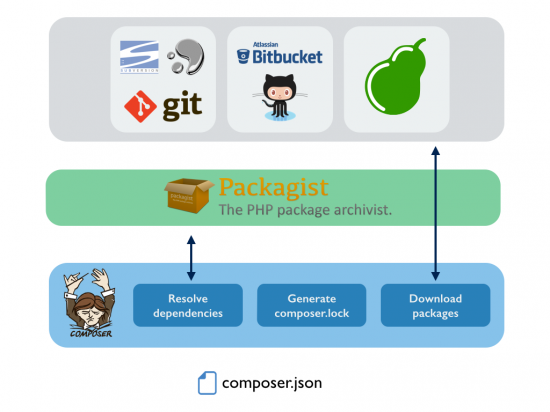
In Laravel, Composer is the primary tool used for dependency management. It acts as the backbone for managing external libraries, packages, and frameworks that Laravel and your application rely on .
- Dependency Management
- Autoloading Classes
- Packages Ecosystem Integration
- Project Initialization
- Managing Configuration Files
Useful commands:
| composer update <package-name>
composer install <package-name>
composer require <package-name>
|
6.2 php artisan command
Artisan is the command line interface included with Laravel.
Artisan exists at the root of your application as the artisan script and provides a number of helpful commands you can use while building your application.
Useful php artisan commands
 1
 2
 3
 4
 5
 6
 7
 8
 9
10
11
12
13
14
15
16
17
18
19
20
21
22
23
24
25
26
27
28
29
30
31
32
33
34
35
36
37
38
39
40
41
42
43
44
45
46
47
48
49
50
51
52
53
54
55
56
57
58
59
60
61
62
63
64
65
66
67
68
69
70
71
72
73
74
75
76
77
78
79
80
81
82
83
84
85
86 | # 1. Basic Information
php artisan --version # Display the current Laravel version
php artisan about # Show detailed application and environment info
php artisan list # List all available Artisan commands
php artisan help <command> # Show detailed help for a specific command
php artisan inspire # Display an inspiring quote
# 2. Development Server
php artisan serve # Start the Laravel development server[](http://127.0.0.1:8000)
php artisan serve --port=8080 # Start server on a custom port
php artisan serve --host=0.0.0.0 # Make server accessible on local network
# 3. Generators (make:*)
php artisan make:model Customer # Create a new Eloquent model
php artisan make:model Post -m # Create model + migration
php artisan make:model Post -mfcr # Model + migration + factory + resourceful controller
php artisan make:controller PostController # Create a new controller
php artisan make:controller Api/V1/PostController --api # Create an API resource controller
php artisan make:migration create_posts_table # Create a new migration file
php artisan make:migration add_slug_to_posts --table=posts # Migration to add column(s) to existing table
php artisan make:seeder PostSeeder # Create a new seeder class
php artisan make:factory PostFactory # Create a new model factory
php artisan make:request StorePostRequest # Create a form request validation class
php artisan make:policy PostPolicy --model=Post # Create a policy class for a model
php artisan make:command SendDailyReport # Create a custom Artisan command
php artisan make:job ProcessPodcast # Create a new job class
php artisan make:mail WelcomeEmail --markdown=emails.welcome # Create a mailable class with markdown template
# 4. Database - Migrations & Seeders
php artisan migrate # Run all outstanding migrations
php artisan migrate --force # Run migrations without confirmation (production)
php artisan migrate:fresh # Drop all tables and re-run all migrations
php artisan migrate:fresh --seed # Fresh migrate + run all seeders
php artisan migrate:rollback # Rollback the last migration batch
php artisan migrate:rollback --step=5 # Rollback the last N migration batches
php artisan migrate:status # Show the status of each migration
php artisan db:seed # Run all Database Seeders
php artisan db:seed --class=UserSeeder # Run a specific seeder class
# 5. Routes
php artisan route:list # Display all registered routes
php artisan route:list --path=api # Filter routes by path/URI
php artisan route:list --compact # Compact route listing (cleaner output)
php artisan route:cache # Cache the routes for faster registration
php artisan route:clear # Clear the route cache
# 6. Cache & Optimization
php artisan optimize:clear # Clear all cached files (config, routes, views, etc.)
php artisan cache:clear # Clear the application cache
php artisan config:cache # Create a cached configuration file
php artisan config:clear # Remove the configuration cache file
php artisan view:cache # Compile all Blade views
php artisan view:clear # Clear all compiled view files
php artisan route:cache # Cache the routes file
# 7. Testing & Tinker
php artisan test # Run the application's test suite
php artisan test --filter testExample # Run tests matching a filter/pattern
php artisan tinker # Interact with your application using REPL
# 8. Queue
php artisan queue:work # Start processing jobs from the queue
php artisan queue:work --queue=high,default --tries=3 # Work specific queues with retry limit
php artisan queue:restart # Restart queue workers after current job
php artisan queue:failed # List all failed queue jobs
php artisan queue:retry all # Retry all failed jobs
php artisan queue:flush # Flush all failed jobs from the failed queue
# 9. Other Essential Commands
php artisan key:generate # Set the application key (APP_KEY)
php artisan storage:link # Create symbolic link from public/storage to storage/app/public
php artisan down # Put the application into maintenance mode
php artisan up # Bring the application out of maintenance mode
php artisan env # Display the current environment
php artisan schedule:run # Run the scheduled commands (for testing)
php artisan schedule:work # Start the schedule worker (runs every minute)
# Quick filters (useful in terminal)
# php artisan list | grep make # See all make:* commands
# php artisan list | grep queue # See all queue-related commands
# php artisan list | grep cache # See all cache-related commands
|
7. The .env file
The .env file stores environment-specific settings such as database credentials, app name, and debug mode.
These values can differ between local, testing, and production .
Warning
Your.env file should not be committed to your application's source control, since each developer / server using your application could require a different environment configuration.
Warning
Do not commit this file to source control.
Never check your production credentials into git.
Keep this file local and secure. It contains sensitive keys.
This file contains private API keys and passwords.
7.1 .env File example
1
2
3
4
5
6
7
8
9
10
11
12
13
14
15
16
17
18
19
20
21
22
23
24
25
26
27
28
29
30
31
32
33
34
35
36
37
38
39
40
41
42
43
44
45
46
47
48
49
50
51
52 | APP_NAME=Laravel
APP_ENV=local
APP_KEY=
APP_DEBUG=true
APP_URL=http://localhost
LOG_CHANNEL=stack
LOG_DEPRECATIONS_CHANNEL=null
LOG_LEVEL=debug
DB_CONNECTION=mysql
DB_HOST=127.0.0.1
DB_PORT=3306
DB_DATABASE=laravel
DB_USERNAME=root
DB_PASSWORD=
BROADCAST_DRIVER=log
CACHE_DRIVER=file
FILESYSTEM_DISK=local
QUEUE_CONNECTION=sync
SESSION_DRIVER=file
SESSION_LIFETIME=120
MEMCACHED_HOST=127.0.0.1
REDIS_HOST=127.0.0.1
REDIS_PASSWORD=null
REDIS_PORT=6379
MAIL_MAILER=smtp
MAIL_HOST=mailhog
MAIL_PORT=1025
MAIL_USERNAME=null
MAIL_PASSWORD=null
MAIL_ENCRYPTION=null
MAIL_FROM_ADDRESS="hello@example.com"
MAIL_FROM_NAME="${APP_NAME}"
AWS_ACCESS_KEY_ID=
AWS_SECRET_ACCESS_KEY=
AWS_DEFAULT_REGION=us-east-1
AWS_BUCKET=
AWS_USE_PATH_STYLE_ENDPOINT=false
PUSHER_APP_ID=
PUSHER_APP_KEY=
PUSHER_APP_SECRET=
PUSHER_APP_CLUSTER=mt1
MIX_PUSHER_APP_KEY="${PUSHER_APP_KEY}"
MIX_PUSHER_APP_CLUSTER="${PUSHER_APP_CLUSTER}"
|
References
https://laravel.com/framework/docs/structure
https://laravel.com/framework/docs/
https://kodytechnolab.com/blog/top-10-laravel-packages/
https://it.badykov.com/blog/2018/11/20/composer-dependency/
https://laravel.com/framework/docs/13.x/artisan
https://ithelp.ithome.com.tw/articles/10333919
https://compilebytes.com/
https://laravel.com/framework/docs/13.x/configuration