Module - 2 Single Area OSPF Config
2026-08-20 17:09
Tags: #enterpriseNetwork
Author: Duke Hsu
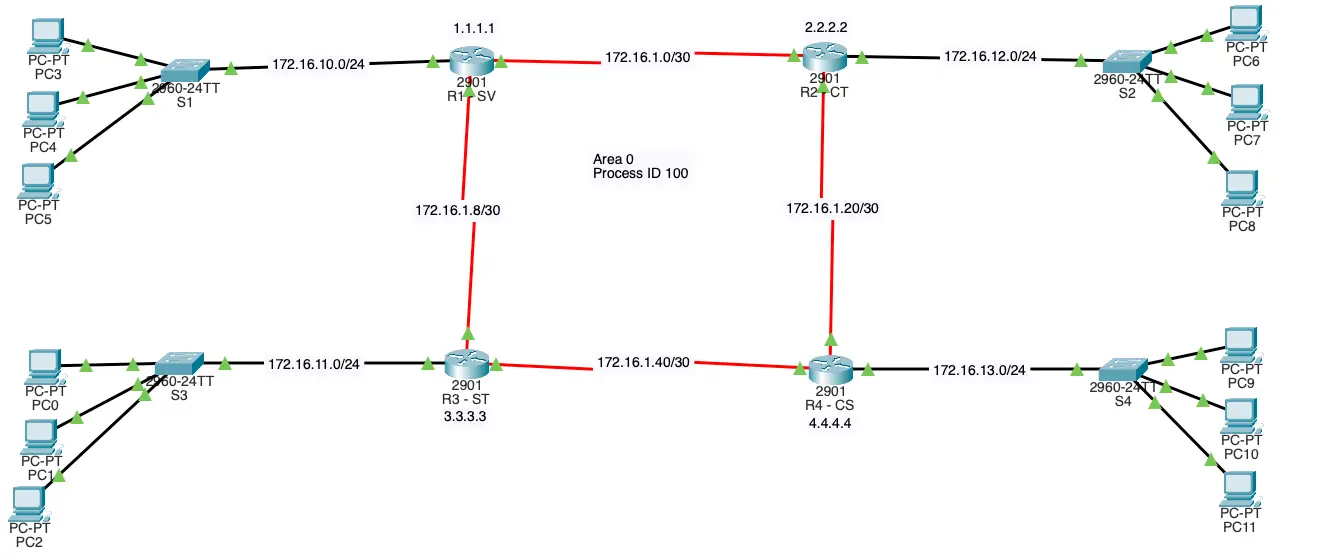
Laboratory Exercise 1 Configuring OSPFv2 in a Single Area
Addressing Table
|
|
|
|
|
| Device |
Interface |
IP Address |
Subnet Mask |
Default Gateway |
| R1 |
G0/0 |
172.16.10.1 |
255.255.255.0 |
|
|
S0/0/0 |
172.16.1.1 |
255.255.255.252 |
|
|
S0/0/1 |
172.16.1.9 |
255.255.255.252 |
|
|
|
|
|
|
| R2 |
G0/0 |
172.16.12.1 |
255.255.255.0 |
|
|
S0/0/0 |
172.16.1.2 |
255.255.255.252 |
|
|
S0/0/1 |
172.16.20.2 |
255.255.255.252 |
|
|
|
|
|
|
| R3 |
G0/0 |
172.16.11.1 |
255.255.255.0 |
N/A |
|
S0/0/0 |
172.16.1.41 |
255.255.255.252 |
N/A |
|
S0/0/1 |
172.16.1.10 |
255.255.255.252 |
N/A |
|
|
|
|
|
| R4 |
G0/0 |
172.16.13.1 |
255.255.255.0 |
N/A |
|
S0/0/0 |
172.16.1.42 |
255.255.255.252 |
N/A |
|
S0/0/1 |
172.16.1.21 |
255.255.255.252 |
N/A |
Objectives
Part 1: Configure OSPFv2 Routing
Part 2: Verify the Configurations
Background
In this activity, the IP addressing is already configured. You are responsible for configuring the three router topology with basic single area OSPFv2 and then verifying connectivity between end devices.
Use the following requirements to configure OSPF routing on all three routers:
- Process ID 100
- Router ID for each router: R1 = 1.1.1.1; R2 = 2.2.2.2; R3 = 3.3.3.3 ; R4 = 4.4.4.4
- Network address for each interface
- LAN interface set to passive (do not use the default keyword)
Step 2: Verify OSPF routing is operational.
On each router, the routing table should now have a route to every network in the topology.
Part 2: Verify the Configurations
Each PC should be able to ping the other two PCs. If not, check your configurations.
OSPF Configuration
R1
 1
 2
 3
 4
 5
 6
 7
 8
 9
10
11
12
13
14
15
16
17
18
19
20 | R1(config)#interface loopback 0
R1(config-if)#ip address 1.1.1.1 255.255.255.255
R1(config-if)#exit
R1(config)#interface serial 0/0/0
R1(config-if)#ip address 172.16.1.1 255.255.255.252
R1(config-if)#no shutdown
R1(config)#interface serial 0/0/1
R1(config-if)#ip address 172.16.1.9 255.255.255.252
R1(config-if)#no shutdown
R1#show ip interface brief
R1(config)#router ospf 100
R1(config-router)#passive-interface gigabitEthernet 0/0
R1(config-router)#network 172.16.1.0 0.0.0.3 area 0
R1(config-router)#network 172.16.1.8 0.0.0.3 area 0
R1#show ip protocols
|
R2
 1
 2
 3
 4
 5
 6
 7
 8
 9
10
11
12
13
14
15
16
17
18
19
20
21 | R1(config)#interface loopback 0
R1(config-if)#ip address 2.2.2.2 255.255.255.255
R1(config-if)#exit
R2(config)#interface serial 0/0/0
R1(config-if)#ip address 172.16.1.2 255.255.255.252
R1(config-if)#no shutdown
R2(config)#interface serial 0/0/1
R1(config-if)#ip address 172.16.1.22 255.255.255.252
R1(config-if)#no shutdown
R2#show ip interface brief
R2(config)#router ospf 100
R2(config-router)#passive-interface gigabitEthernet 0/0
R1(config-router)#network 172.16.1.0 0.0.0.3 area 0
R1(config-router)#network 172.16.1.20 0.0.0.3 area 0
R2#show ip protocols
|
R3
 1
 2
 3
 4
 5
 6
 7
 8
 9
10
11
12
13
14
15
16
17
18
19
20
21 | R1(config)#interface loopback 0
R1(config-if)#ip address 3.3.3.3 255.255.255.255
R1(config-if)#exit
R2(config)#interface serial 0/0/0
R1(config-if)#ip address 172.16.1.41 255.255.255.252
R1(config-if)#no shutdown
R2(config)#interface serial 0/0/1
R1(config-if)#ip address 172.16.1.10 255.255.255.252
R1(config-if)#no shutdown
R2#show ip interface brief
R2(config)#router ospf 100
R2(config-router)#passive-interface gigabitEthernet 0/0
R1(config-router)#network 172.16.1.8 0.0.0.3 area 0
R1(config-router)#network 172.16.1.40 0.0.0.3 area 0
R2#show ip protocols
|
R4
 1
 2
 3
 4
 5
 6
 7
 8
 9
10
11
12
13
14
15
16
17
18
19
20
21 | R1(config)#interface loopback 0
R1(config-if)#ip address 4.4.4.4 255.255.255.255
R1(config-if)#exit
R2(config)#interface serial 0/0/0
R1(config-if)#ip address 172.16.1.42 255.255.255.252
R1(config-if)#no shutdown
R2(config)#interface serial 0/0/1
R1(config-if)#ip address 172.16.1.21 255.255.255.252
R1(config-if)#no shutdown
R2#show ip interface brief
R2(config)#router ospf 100
R2(config-router)#passive-interface gigabitEthernet 0/0
R1(config-router)#network 172.16.1.40 0.0.0.3 area 0
R1(config-router)#network 172.16.1.20 0.0.0.3 area 0
R2#show ip protocols
|
DHCP Configuration
R1
 1
 2
 3
 4
 5
 6
 7
 8
 9
10
11
12
13
14
15
16
17
18
19
20
21
22
23
24
25 | R2(config)#interface gigabitEthernet 0/0
R2(config-if)#ip address 172.16.10.1 255.255.255.0
R2(config-if)#no shutdown
R2(config-if)#exit
R1(config)#ip dhcp excluded-address 172.16.10.1 172.16.10.100
R1(config)#ip dhcp pool LAN10
R1(dhcp-config)#network 172.16.10.0 255.255.255.0
R1(dhcp-config)#default-router 172.16.10.1
R1(dhcp-config)#domain-name dukehsu.com
R1(dhcp-config)#dns-server 8.8.8.8
R1(dhcp-config)#end
R1#show ip dhcp pool
R1#show ip dhcp binding
R1#config t
R1(config)#router ospf 100
R1(config-router)#network 172.16.10.0 0.0.0.255 area 0
R1(config-router)#end
R1#show ip protocols
|
R2
 1
 2
 3
 4
 5
 6
 7
 8
 9
10
11
12
13
14
15
16
17
18
19
20
21
22
23
24
25 | R2(config)#interface gigabitEthernet 0/0
R2(config-if)#ip address 172.16.12.1 255.255.255.0
R2(config-if)#no shutdown
R2(config-if)#exit
R1(config)#ip dhcp excluded-address 172.16.12.1 172.16.12.100
R1(config)#ip dhcp pool LAN10
R1(dhcp-config)#network 172.16.12.0 255.255.255.0
R1(dhcp-config)#default-router 172.16.12.1
R1(dhcp-config)#domain-name dukehsu.com
R1(dhcp-config)#dns-server 8.8.8.8
R1(dhcp-config)#end
R1#show ip dhcp pool
R1#show ip dhcp binding
R1#config t
R1(config)#router ospf 100
R1(config-router)#network 172.16.12.0 0.0.0.255 area 0
R1(config-router)#end
R1#show ip protocols
|
R3
 1
 2
 3
 4
 5
 6
 7
 8
 9
10
11
12
13
14
15
16
17
18
19
20
21
22
23
24
25 | R2(config)#interface gigabitEthernet 0/0
R2(config-if)#ip address 172.16.11.1 255.255.255.0
R2(config-if)#no shutdown
R2(config-if)#exit
R1(config)#ip dhcp excluded-address 172.16.11.1 172.16.12.100
R1(config)#ip dhcp pool LAN10
R1(dhcp-config)#network 172.16.11.0 255.255.255.0
R1(dhcp-config)#default-router 172.16.11.1
R1(dhcp-config)#domain-name dukehsu.com
R1(dhcp-config)#dns-server 8.8.8.8
R1(dhcp-config)#end
R1#show ip dhcp pool
R1#show ip dhcp binding
R1#config t
R1(config)#router ospf 100
R1(config-router)#network 172.16.11.0 0.0.0.255 area 0
R1(config-router)#end
R1#show ip protocols
|
R4
 1
 2
 3
 4
 5
 6
 7
 8
 9
10
11
12
13
14
15
16
17
18
19
20
21
22
23
24
25 | R2(config)#interface gigabitEthernet 0/0
R2(config-if)#ip address 172.16.13.1 255.255.255.0
R2(config-if)#no shutdown
R2(config-if)#exit
R1(config)#ip dhcp excluded-address 172.16.13.1 172.16.12.100
R1(config)#ip dhcp pool LAN10
R1(dhcp-config)#network 172.16.13.0 255.255.255.0
R1(dhcp-config)#default-router 172.16.13.1
R1(dhcp-config)#domain-name dukehsu.com
R1(dhcp-config)#dns-server 8.8.8.8
R1(dhcp-config)#end
R1#show ip dhcp pool
R1#show ip dhcp binding
R1#config t
R1(config)#router ospf 100
R1(config-router)#network 172.16.13.0 0.0.0.255 area 0
R1(config-router)#end
R1#show ip protocols
|
Results
OSPF router
 1
 2
 3
 4
 5
 6
 7
 8
 9
10
11
12
13 | R1#show ip route ospf
172.16.0.0/16 is variably subnetted, 11 subnets, 3 masks
O 172.16.1.20 [110/192] via 172.16.1.10, 00:42:24, Serial0/0/1
O 172.16.1.40 [110/128] via 172.16.1.10, 00:42:24, Serial0/0/1
O 172.16.11.0 [110/65] via 172.16.1.10, 00:11:18, Serial0/0/1
O 172.16.12.0 [110/193] via 172.16.1.10, 00:17:42, Serial0/0/1
O 172.16.13.0 [110/129] via 172.16.1.10, 00:18:36, Serial0/0/1
|
References
Internet