Module - 2 IAS Objectives
2026-08-10 13:00
Tags: #IAS
Author: Duke Hsu
Topic
- Security Objective and Real-world examples
- CIA
- Security Controls
- Authorization
- Accountability
- Non-Repudiation
- Privacy
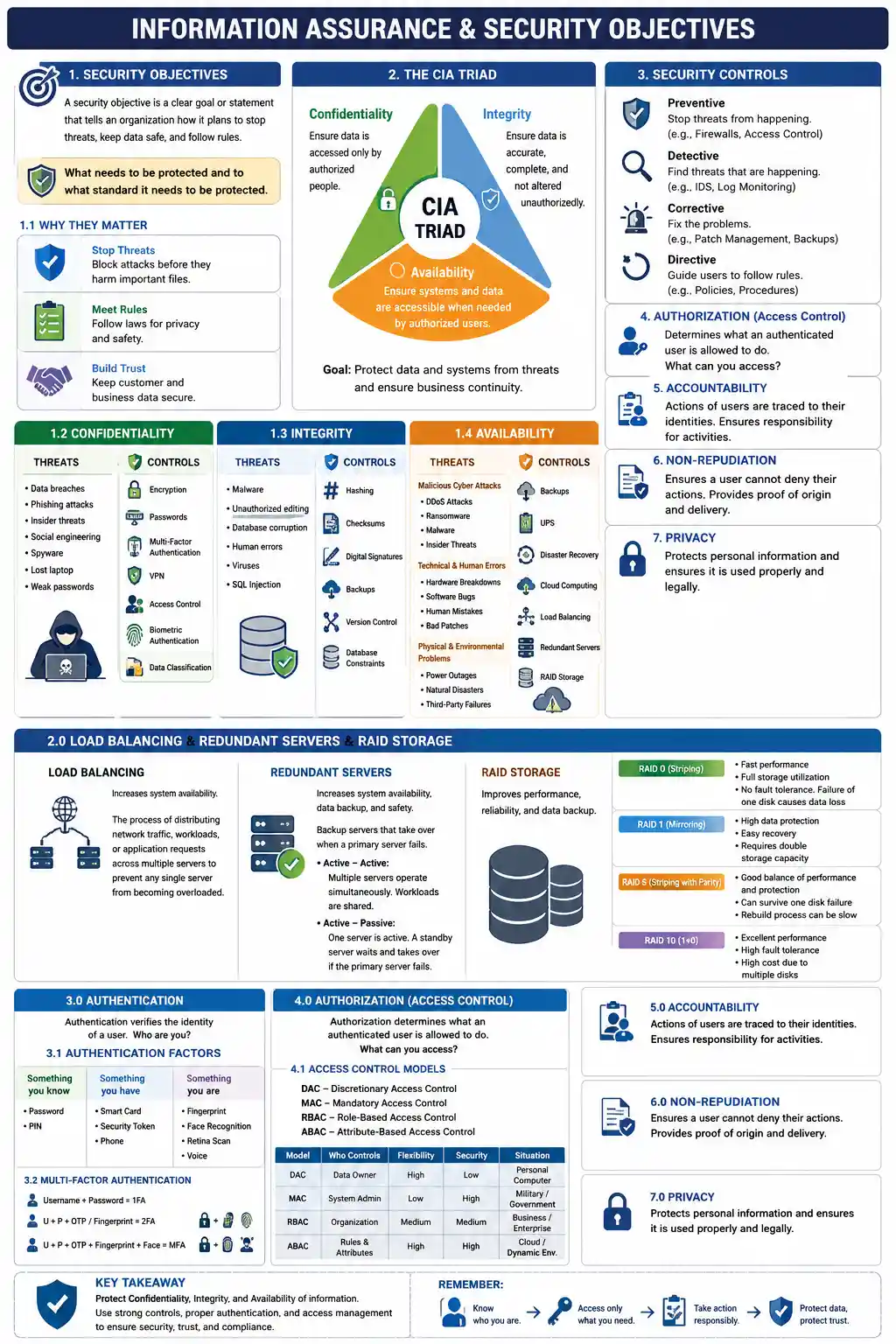
1.0 Security Objectives - Safety Goal
A security objective is a clear goal or statement that tells an organization how it plans to stop threats, keep data safe, and follow rules.
What needs to be protected and to what standard it needs to be protected.
1.1 Why They Matter
- Stop Threats: Block attacks before they harm important files.
- Meet Rule: Follow laws for privacy and safety.
- Build Trust: Keep customer and business data secure.
1.2 Threats to Confidentiality - Security
- Data breaches
- Phishing attacks
- Insider threats
- Social engineering
- Spyware
- Lost laptop
- Weak passwords
1.2.1 Controls for Confidentiality
- Encryption
- Passwords
- Multi-Factor Authentication
- VPN
- Access Control
- Biometric Authentication
- Data Classification
Real-world example: - Hospital Database - School Database - Gov Database
1.3 Threats to Integrity - Completed
- Malware
- Unauthorized editing
- Database corruption
- Human errors
- Viruses
- SQL Injection
1.3.1 Controls for Integrity
- Hashing
- Checksums
- Digital Signatures
- Backups
- Version Control
- Database Constraints
1.4 Threats to Availability - Readiness
- Malicious Cyber Attacks
- DDoS Attacks
- Ransomware
- Malware
- Insider Threats
- Technical and Human Errors
- Hardware Breakdowns
- Software Bugs
- Human Mistakes
- Bad Patches
- Physical and Environmental Problems
- Power Outages
- Natural Disasters
- Third-Party Failures
1.4.1 Controls for Availability
- Backups
- UPS
- Disaster Recovery
- Cloud Computing
- Load Balancing
- Redundant Servers
- RAID Storage
2.0 Load Balancing & Redundant Servers & RAID Storage
Load Balancing - Increases system availability
- The process of distributing network traffic, workloads, or application requests across multiple servers to prevent any single server from becoming overloaded.
Redundant Servers - Increases system availability / Data backup /Safety
- Redundant Servers are backup servers that take over when a primary server fails.
- Redundant Types
- Active - Active
Multiple servers operate simultaneously.
Workloads are shared among servers. - Active - Passive One Server is active A standby server waits and takes over if the primary server fails .
- Active - Active
Multiple servers operate simultaneously.
RAID - To improve performance, reliability , data backup
Common RAID Levels
• RAID 0 (Striping): Data is split across multiple disks.
• Advantages: Fast performance and Full storage utilization
• Disadvantages: No fault tolerance and Failure of one disk causes data loss
• RAID 1 (Mirroring): Data is copied identically to two disks.
• Advantages: High data protection and Easy recovery
• Disadvantage: Requires double storage capacity
• RAID 5 (Striping with Parity): Data and parity information are distributed across disks.
• Advantages: Good balance of performance and protection and Can survive one disk failure
• Disadvantage: Rebuild process can be slow
• RAID 10 (1+0): Combination of RAID 1 and RAID 0.
• Advantages: Excellent performance and High fault tolerance
• Disadvantage: High cost due to multiple disk
3.0 Authentication - Ask login
Authentication verifies the identify of a user. - Who are you ??
3.1 Authentication Factors
| Something you know | you have | you are |
|---|---|---|
| PASSWORD | Smart Card | Fingerprint |
| PIN | Security Token | Face Recognition |
| Phone | Retina Scan | |
| Voice |
3.2 Multi-Factor Authentication
- Username + Password = 1 Factor Authentication
- U + P + OTP / Fingerprint = 2FA
- U + P + OTP + Fingerprint + Face Recognition = MFA
4.0 Authorization - Access Control
Authorization determines what an authenticated user is allowed to do - What can you access?
4.1 Access Control Models
- DAC - Discretionary Access Control
- MAC - Mandatory Access Control
- RBAC - Role-Based Access Control
- ABAC - Attribute-Based Access Control
| Model | Who Control | Flexibility | Security Level | Situation |
|---|---|---|---|---|
| DAC | Data Owner | High | Low | Personal Computer |
| MAC | System / Stem Administor | Low | High | Government / Military |
| RBAC | Role | Medium | Medium High | Enterprise System |
| ABAC | Attribute / Dynamic | High | High | Cloud / Zero Trust |
5.0 Accountability - Who did what , when , where?
Every action performed in a system can be traced to an individual .
Accountability Tools
- Audit Logs
- System logs
- Login History
- CCTV
- Activity Monitoring
- SIEM
6.0 Non-Repudiation - End user don't have choice
Ensures a user cannot deny performing an action.
The system keeps an audit log of all user activities, including adding, deleting, updating, and querying data. These logs cannot be modified or deleted by users.
6.1 Technologies:
- Digital Signature, Certificates, PKI, Hash Functions, Time Stamps, and Email Signing.
7.0 Privacy
Privacy protects personal information and controls how it is collected, used, stored, and shared.
7.1 Privacy Laws
- Philippines: Republic Act No. 10173
- European Union: GDPR
- USA: Sector-specific privacy laws
References
RAID simulation https://share.gemini.google/Xa7G42TNfH0W