Module - 5 ACLs For IPv4 Configuration
2026-09-29 17:15
Tags: #enterpriseNetwork
Author: Duke Hsu
Topic
- ACL Planning Concept
- Standard IPv4 ACLs Concept and Hands-on
- ACL Modification and Statistics
- Secure VTY Access and Hands-on
- Extended IPv4 ACLs Concept and Hands-on
- Verification and Practice
IPv4 ACL Configuration
Access Control Lists"] M --> A["1. ACL Planning
pp. 2–3"] A --> B["2. Standard IPv4 ACLs
pp. 4–12"] B --> C["3. ACL Modification and Statistics
pp. 13–18"] C --> D["4. Secure VTY Access
pp. 19–21"] D --> E["5. Extended IPv4 ACLs
pp. 22–36"] E --> F["6. Verification and Practice
pp. 37–43"] AC["Concept
Define permitted and denied traffic
Translate requirements into ACEs"] AH["Hands-on Practice
Plan policies and commands
Add documentation using remark
Test after configuration"] A --- AC A --- AH BC["Concept
Filter by source IPv4 address
Numbered ACLs
Named ACLs"] BH["Hands-on Practice
access-list
ip access-list standard
ip access-group
Select the interface and direction: in / out"] B --- BC B --- BH CC["Concept
Sequence Numbers: identify ACEs
Implicit Deny: reject unmatched traffic
Matches: count ACE hits"] CH["Hands-on Practice
Prepare ACL changes in a text editor
Remove an ACE using no sequence-number
Insert an ACE using a sequence number
clear access-list counters"] C --- CC C --- CH DC["Concept
Restrict remote management by source host
Distinguish access restrictions from authentication"] DH["Hands-on Practice
Create a Standard ACL
line vty
login local
Apply the ACL using access-class"] D --- DC D --- DH EC["Concept
Match source, destination, protocol, and port
Usually apply close to the source
established: match TCP ACK or RST flags
Does not provide full connection tracking"] EH["Hands-on Practice
Numbered or Named ACLs
ip access-list extended
permit / deny tcp
eq 80 / eq 443
SURFING / BROWSING examples"] E --- EC E --- EH FC["Concept
Configuration alone does not prove correct operation
Test both permitted and denied traffic"] FH["Hands-on Practice
show running-config
show ip interface
show access-lists
Generate traffic and observe counters
Packet Tracer activities and lab"] F --- FC F --- FH
1. ACL Planning Concept and Hands-on
1.1 ACL Planning
All access control lists (ACLs) must be planned. When configuring a complex ACL, it is suggested that you
- Use a text editor and write out the specifics of the policy to be implemented.
- Add the IOS configuration commands to accomplish those tasks
- Include remarks to document the ACL
- Copy and pasts the commands onto the device
- Always thoroughly test and ACL to ensure that it correctly applies the desired policy
2. Standard IPv4 ACLs and Hands-on
2.1 access-list command
Syntax
R1(config)# access-list <access-list-number> {deny | permit | remark [text]} {host |source [source-wildcard]| any}

2.2 Parameter table
Notes
Use the no access-list <access-list-number> global configuration command to remove a numbered standard ACL
| Parameter | Description |
|---|---|
| access-list-number | Number range is 1 to 99 or 1300 to 1999 |
| deny | Denies access if the condition is matched |
| permit | Permits access if the condition is matched |
| remark text | Optional text entry for documentation purposes |
| source | Identifies the source network or host address to filter |
| source-wildcard | Optional 32-bit wildcard mask that is applied to the source |
| log | Optional Generates and sends an informational message when the ACE is matched |
2.3 Named and Numbered Standard IPv4 ACL
a. Command ip access-list standard
Use the ip access-list standard command to create a named standard ACL.
- ACL names are alphanumeric, case sensitive, and must be unique
- Capitalizing ACL names is not required but makes them stand out when viewing the
running-configoutput
R1(config)# ip access-list standard <access-list-name>
Example:
1 2 3 4 5 6 7 8 9 10 11 12 13 14 15 16 | |
Example 1:
1 2 3 4 5 6 7 8 9 10 11 12 13 14 15 16 17 18 19 20 21 22 23 24 25 26 27 | |
Verify
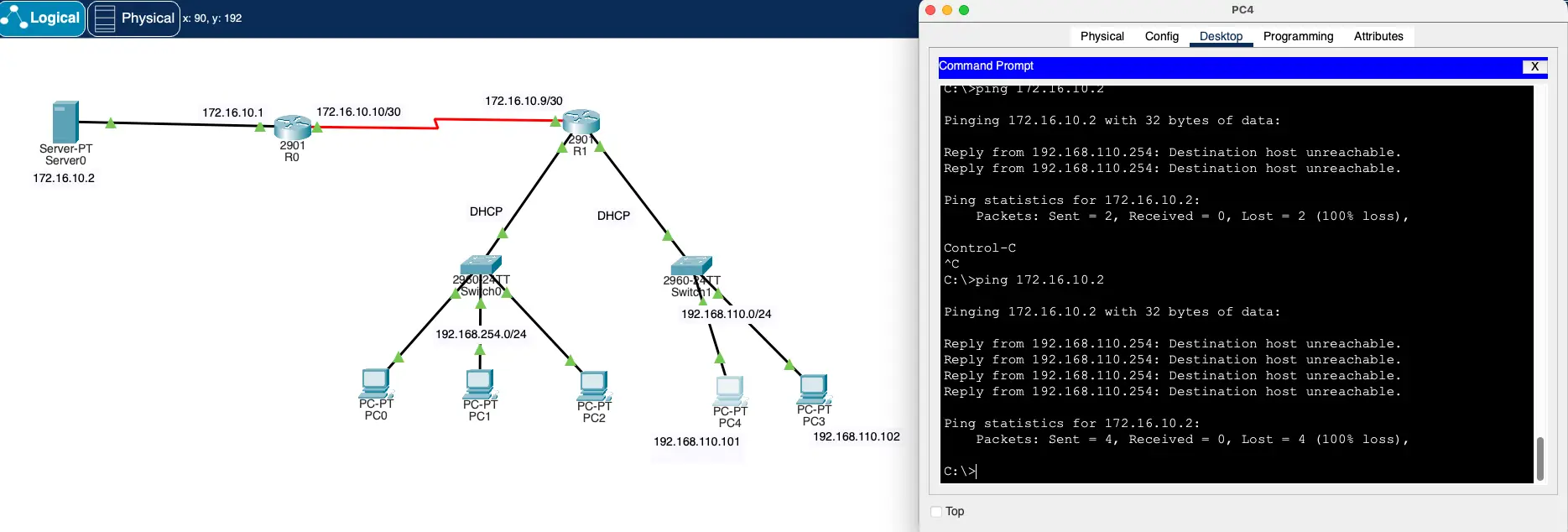
b. Numbered Standard ACL
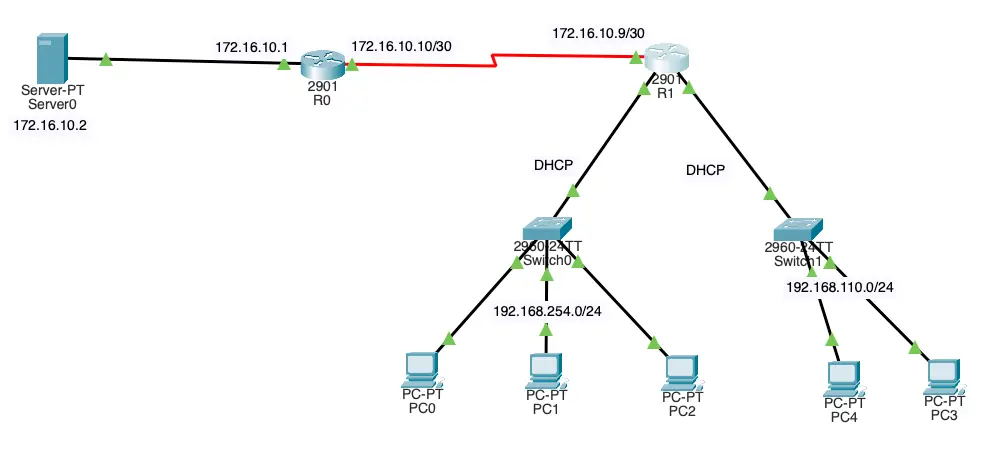
Example:
Permit traffic from host 192.168.110.101 and 192.168.254.0/24 network out interface serial 0/0/0 on router R1
IOS command
1 2 3 4 5 6 7 8 9 10 11 12 13 14 15 16 17 18 19 20 21 22 23 24 25 26 27 28 29 30 31 32 33 34 35 36 37 38 39 40 41 42 43 44 45 46 | |
Verify
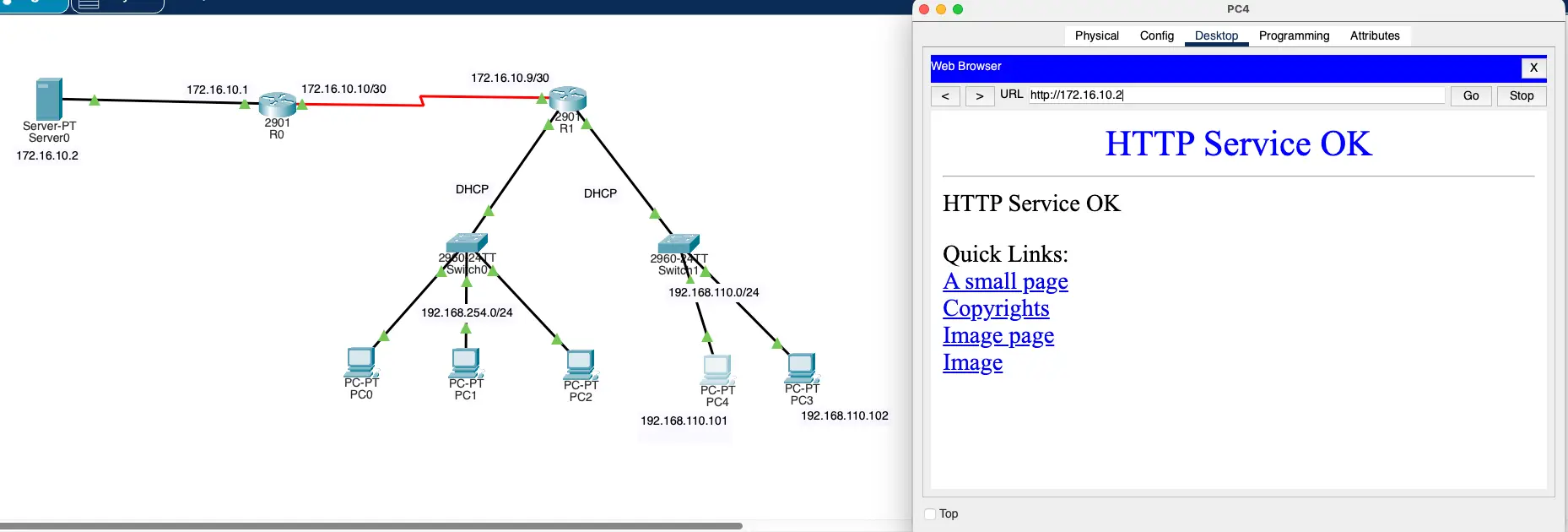 Figure -1 PC 110.101 -ACL tester
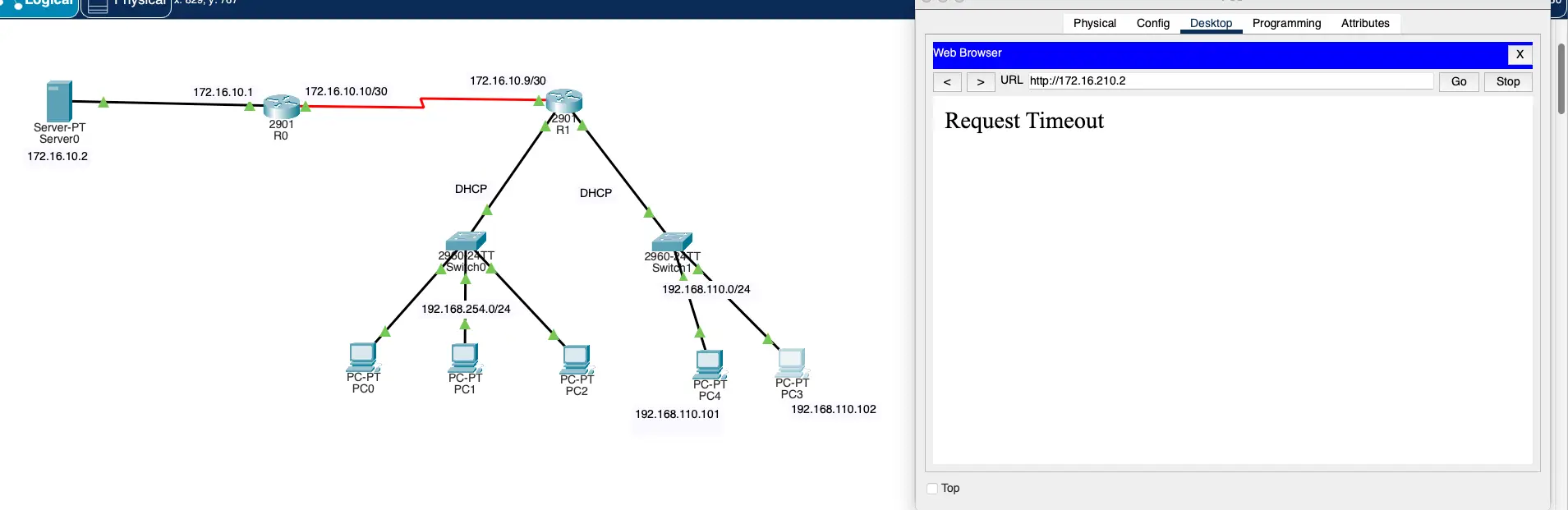 Figure -2 PC 110.102 -ACL tester
2.4 Apply a Standard IPv4 ACL
a. Command ip access-group
After a standard IPv4 ACL is configured , it must be linked to an interface or feature
- The
ip access-groupcommand is used to bind a numbered or named standard IPv4 ACL to an interface. - To remove an ACL from an interface , first enter the
no ip access-groupinterface configuration command .
R1(config-if)# ip access-group <access-list-number | access-list-name> {in | out}
Example:
1 2 3 4 5 6 7 8 9 10 11 | |
3. ACL Modification and Statistics
After an ACL is configured , it may need to be modified. ACLs with multiple ACEs can be complex to configure. Sometimes the configured ACE does not yield the expected behaviors.
Two methods to use when modifying an ACL:
- Use a text editor
- Use sequence numbers
3.1 Text Editor Method
ACLs with multiple ACEs should be created in a text editor. This allows you to plan the required ACEs, create the ACL, and then paste it into the router interface. It also simplifies the tasks to edit and fix an ACL.
To correct an error in an ACL:
- Step 1 Copy the ACL from the running configuration and paste it into the text editor.
- Step 2 Make the necessary edits or changes.
- Step 3 Remove the perviously configured ACL on the router.
- Step 4 Copy and paste the edited ACL back to the router.
3.2 Sequence Number Method
An ACL ACE can be deleted or added using the ACL sequence numbers.
- Use the
ip access-list standardcommand to edit an ACL - Statements cannot be overwritten using an existing sequence number
- The current statement must be deleted first with the
no 10command . - Then the correct ACE can be added using sequence number.
3.2.1 Modify
Example:
1 2 3 4 5 6 7 8 9 10 11 12 13 14 15 16 17 18 19 20 21 22 23 24 25 26 27 28 29 30 31 32 33 34 35 36 | |
3.2.2 Append
Example:
1 2 3 4 5 6 7 8 9 10 11 12 13 14 15 16 17 18 19 20 21 22 23 24 25 26 27 28 29 30 31 | |
3.3 ACL Statistics
The show access-lists command in the example shows statistics for each statement that has been matched
- Matches
- Note that the implied deny any statement does not display any statistic
- To track how many implicit denied packets have been matched, you must manually configure the deny any command.
- Use the
clear access-list counters <access-list-nam>to clear the ACL statistics.
Example:
1 2 3 4 5 6 7 8 9 10 11 12 13 14 15 16 17 18 19 20 21 22 23 24 25 26 27 28 29 30 31 32 | |
4. Secure VTY Access
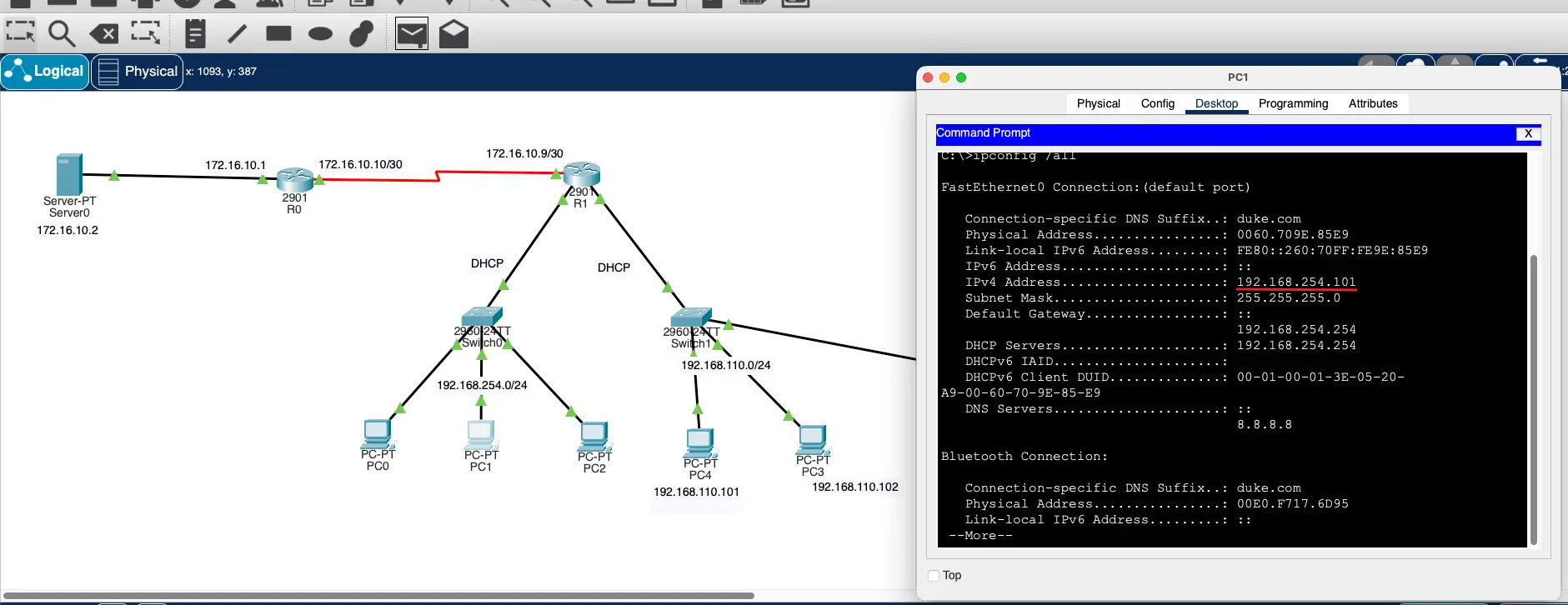
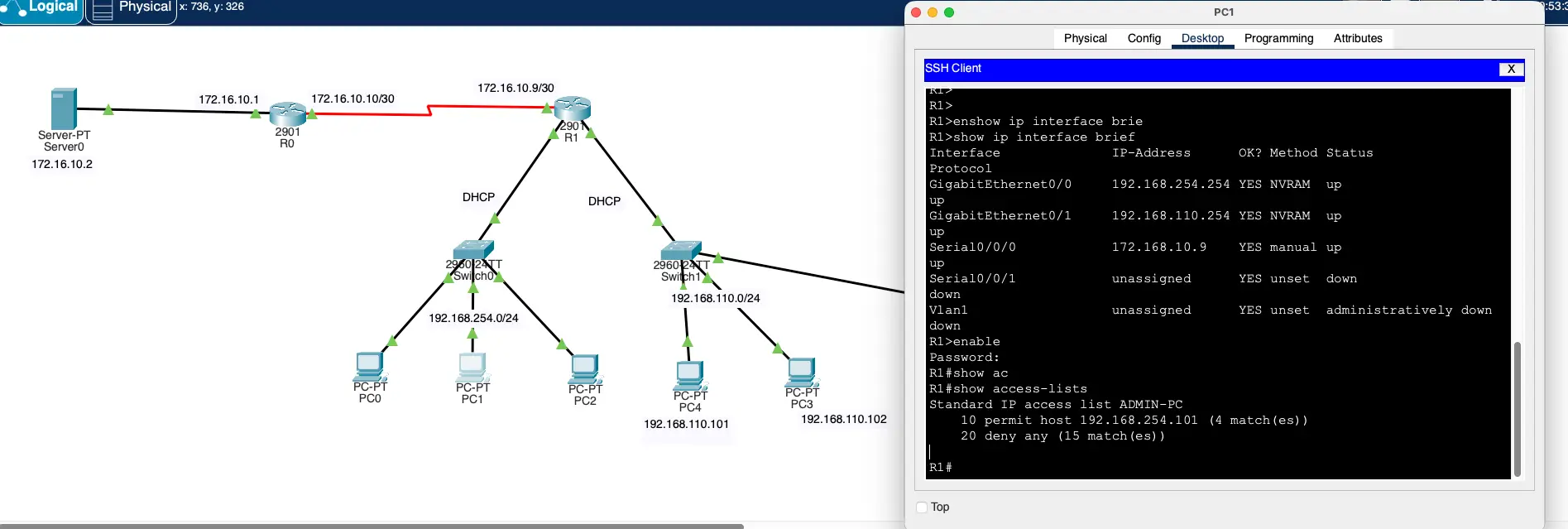
A standard ACL can secure remote administrative access to a device using the VTY lines by implementing the following two steps:
- Create an ACL to identify which administrative hosts should be allowed remote access.
- Apply the ACL to incoming traffic on the VTY lines.
R1(config-line)# access-class <access-list-number | access-list-name> {in | out}
4.1 Secure VTY Access Step by Step
Step 1 - Set username and password
R1(config)# username <user-name> secret <pass-word>
Step 2 - Set access-list standard Host
R1(config)# ip access-list standard <access-list-name>
Step 3 - Set ACL details
1 2 3 4 | |
Step 4 - Set VTY
1 2 3 4 5 | |
Example:
1 2 3 4 5 6 7 8 9 10 11 12 13 14 15 16 17 18 19 20 21 22 23 24 25 26 27 28 29 30 31 32 33 34 35 36 37 38 39 40 | |
Verify
5. Extended IPv4 ACLs
Extended ACLs provide a greater degree of control. They can filter on source address, destination address, protocol (eg. ICMP, TCP, UDP, IP), and port number
Extended ACLs can filter on internet protocols and protst. Use the ? to get help when entering a complex ACE.
The four highlighted protocols are the most popular options. such as ICPM, IP, TCP, UDP.
5.1 Numbered Extended ACL
- Created using the
access-list <access-list-number>global configuration command
Example:
1 2 3 4 5 6 7 8 9 | |
5.2 Named Extended ACL
- Created using the
ip access-list extended <access-list-name>
Example:
1 2 3 4 5 6 7 8 9 10 11 12 13 14 15 16 17 18 19 20 21 22 23 24 25 26 27 28 29 30 31 32 33 | |
5.2.1 TCP Established Extended ACL
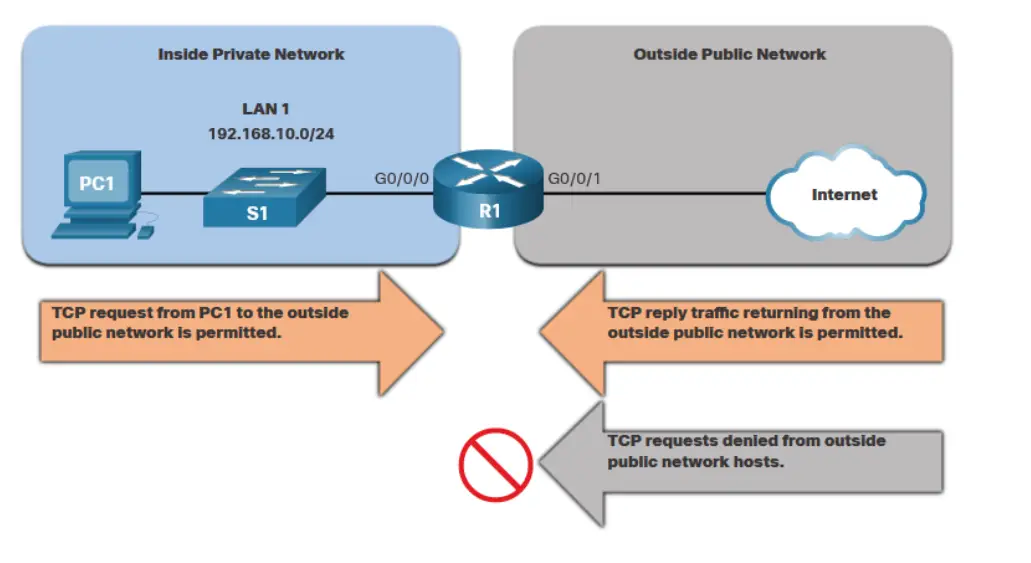
TCP can also perform basic stateful firewall services using the TCP established keyword.
-
The
establishedkeyword enables inside traffic to exit the inside private network and permits the returning reply traffic to enter the inside private network. -
TCP traffic generated by an outside host and attempting to communicate with an inside host in denied.
1 2 3 4 | |
5.2.2 Verify Extended ACLs (Count)
The show access-lists command can be used to confirm that the ACLs work as expected. The command displays statistic counters that increases whenever an ACE is matched
Note
Traffic must be generated to verify the operation of the ACL
References
https://www.cisco.com/c/en/us/support/docs/security/ios-firewall/23602-confaccesslists.html