25 Project Management Tools for Students
Created: 2026-08-04 10:47
Updated: 2026-08-26
Tags: #tools #pm
Author: Duke Hsu
Learning Goals
After reading this note, students should be able to:
- Explain four main types of project management tools.
- Compare free plans, paid plans, strengths, and limits.
- Choose a suitable tool for a student project.
Tool Categories
Some tools can fit more than one category. The table below shows their main use.
| Category | Main purpose | Tools in this note |
|---|---|---|
| General and team collaboration | Share tasks, files, messages, and team updates | Trello, Asana, ClickUp, Notion, Microsoft Planner, Google Workspace, Slack, Basecamp |
| Agile and Scrum | Manage a backlog, sprints, Scrum boards, Kanban flow, and issues | Jira, monday.com, Wrike, Zoho Projects, KanbanFlow, Taiga, Scrumwise |
| Mind mapping, planning, and visualization | Show ideas, diagrams, plans, and structured data | Miro, MindMeister, Lucidchart, Xmind, Airtable |
| Academic-friendly and lightweight | Start quickly, work with a small team, or make a simple plan | GanttProject, Quire, Freedcamp, Taskworld, nTask |
Cost Words Used in This Note
| Word | Meaning |
|---|---|
| Free plan | You can keep using a limited version without paying. |
| Paid plan | You pay for more users, storage, views, security, or other features. |
| Free trial | You can test paid features for a short time. It is not a permanent free plan. |
| Included | The tool has no extra cost only when you already have a related subscription. |
| Open source | The software code is available. Self-hosting can be free, but setup and server costs may still exist. |
Pricing and plan limits can change. The information below was checked on 2026-08-26. Tool names link to official plan pages.
1. General and Team Collaboration Tools
| Tool | Free or paid? | Main strengths | Main limits |
|---|---|---|---|
| Trello | Free plan for up to 10 people and 10 boards in one Workspace. Paid plans are available. | Very easy Kanban boards; fast setup; good for clear task ownership. | The free plan has limited boards, file size, automation, and project views. It is weak for complex dependencies. |
| Asana | Free Personal plan for up to 2 users. Paid plans are available. | Clear list, board, and calendar views; good task structure; many integrations. | The free team size is very small. Timeline, Gantt, forms, custom fields, and stronger reporting need a paid plan. |
| ClickUp | Free Forever plan. Paid plans are available. | Many tools in one place, including tasks, Docs, boards, calendar, and basic sprints. | The large number of features can confuse new users. The free plan has only 60 MB of file storage and limits some advanced features. |
| Notion | Free for personal use. Paid plans are available. Eligible university students and teachers may get Plus at no cost. | Combines notes, wiki pages, databases, and project tasks; very flexible. | Teams on the free plan have limits. Setup can take time, and it is less strict than a dedicated project management tool. |
| Microsoft Planner | Basic Planner is included in eligible Microsoft 365 plans. Premium Planner plans cost extra. | Works well with Teams and other Microsoft 365 apps; simple board, grid, schedule, and chart views. | It is not a separate permanent free service. Advanced project features need a premium license. |
| Google Workspace for Education | Education Fundamentals has no cost for qualified schools. Business editions are paid. Personal Google apps also have free versions. | Excellent real-time work in Docs, Sheets, Slides, Drive, Meet, and Calendar; familiar to many students. | It is a group of apps, not one full project tracker. Teams must design their own task process, often in Sheets or Tasks. |
| Slack | Free plan. Paid plans are available. | Strong team chat, channels, file sharing, notifications, and app connections. | The free plan gives access to only the most recent 90 days of messages, and older content can be deleted. It does not replace a full task manager. |
| Basecamp | Free personal plan for 1 project and up to 5 users. Paid plans are available. Approved class work can be free for schools and universities. | Simple all-in-one space for tasks, messages, files, chat, and schedules; fixed-price team plans. | The normal free plan is very small. It has fewer advanced workflows and reports than Jira, ClickUp, or Asana. |
2. Agile and Scrum Tools
| Tool | Free or paid? | Main strengths | Main limits |
|---|---|---|---|
| Jira | Free for up to 10 users. Paid plans are available. | Strong Scrum and Kanban support; backlog, sprint, issue, report, and workflow tools. | It can be difficult for beginners. The free plan has 2 GB storage, community support, and limited automation. |
| monday.com | Free forever for up to 2 seats and 3 boards. Paid plans are available. | Colorful and flexible boards; many templates; easy status tracking. | The free plan is too small for many student teams. Scrum work often needs custom setup, and advanced views need payment. |
| Wrike | Free basic plan. Paid plans are available. | Good task and project structure; board and table views; useful for formal team work. | Gantt charts, dashboards, and many planning features need a paid plan. The interface may feel heavy for a small class task. |
| Zoho Projects | Free for up to 5 users and 3 projects. Paid plans are available. | Free Gantt view, subtasks, whiteboard, mobile apps, and Google/Microsoft connections. | Time tracking, advanced dependencies, budgeting, custom fields, and stronger reports need higher plans. |
| KanbanFlow | Free plan with no time limit. Premium is paid. | Clean Kanban board; built-in Pomodoro timer and time tracking; easy WIP limits. | Gantt, attachments, advanced reports, revision history, and many integrations are Premium features. It is less complete than Jira. |
| Taiga | Free open-source self-hosting. Taiga Cloud has a free plan with 1 public project, 1 private project, and 10 MB storage; paid cloud plans are available. | Made for Agile teams; supports Scrum, Kanban, epics, issues, and a backlog; no per-user cloud fee. | The free cloud storage is very small. Self-hosting needs technical setup and server maintenance. |
| Scrumwise | No permanent free plan. It has a 30-day free trial, then a paid per-user plan. | Focused Scrum design; simple backlog, release, sprint, task board, burndown, Kanban, and time tools. | Students must pay after the trial. It is narrower than an all-in-one collaboration suite. |
3. Mind Mapping, Planning, and Visualization Tools
| Tool | Free or paid? | Main strengths | Main limits |
|---|---|---|---|
| Miro | Free plan with 3 editable boards. Paid plans are available. Accredited schools can apply for a free Education plan. | Excellent for brainstorming, workshops, diagrams, sticky notes, and visual planning; many templates. | On the normal free plan, only 3 boards stay editable and boards are not private inside the team. Large boards can become messy. |
| MindMeister | Free Basic plan with 3 mind maps. Paid plans are available. | Easy online mind maps; unlimited collaborators on the free plan; useful presentation mode. | Only 3 maps are free. It is mainly an idea tool, not a full task and schedule system. |
| Lucidchart | Free plan with 3 editable documents and 60 shapes per document. Paid plans are available. | Strong flowcharts, process maps, system diagrams, and professional templates. | The free limits are tight. It is better for diagrams than for daily task management. |
| Xmind | Free plan with core mind-mapping tools and up to 10 online maps. Paid plans are available. | Clean mind maps, many structures, presentation tools, and useful exports on paid plans. | Real-time collaboration, editable Gantt charts, larger online limits, and advanced exports need higher plans. |
| Airtable | Free plan for small teams. It allows up to 5 editors and 1,000 records per base. Paid plans are available. | Combines a spreadsheet with a database; flexible views, forms, links, and simple automations. | It takes time to design a good base. Free records, automation, API calls, and advanced views are limited. |
4. Academic-Friendly and Lightweight Tools
| Tool | Free or paid? | Main strengths | Main limits |
|---|---|---|---|
| GanttProject | Free and open-source desktop software. A paid download is optional support for the project. | Works offline; good Gantt charts, dependencies, milestones, and resource planning; no account needed. | Desktop-first design has weak real-time collaboration. Teams must share and manage the project file carefully. |
| Quire | Free for up to 10 members and 4 projects. Paid plans are available. | Very clear nested task lists plus a Kanban board; good for breaking large work into small steps. | The free plan has project, storage, file, history, and custom-field limits. Larger teams need payment. |
| Freedcamp | Free plan with unlimited tasks, projects, and total storage. Paid plans are available. | Strong free core: tasks, discussions, milestones, calendar, time, and files; friendly to small teams. | The free plan limits each file to 10 MB. Gantt, recurring tasks, custom fields, and several advanced tools need payment. |
| Taskworld | A 14-day Business trial is clear. The same official page also mentions a limited free version, but its current user limits are not shown consistently. Paid plans are available. | Built-in project chat, Kanban boards, files, checklists, and task comments. | Current free-plan information is unclear. Gantt, calendar, dependencies, automation, and advanced search are paid features. |
| nTask | Free Forever Basic plan for up to 5 people. Paid plans are available. | Free tasks, meetings, issues, timesheets, and unlimited workspaces; useful for basic team coordination. | The Basic plan does not include projects, Gantt, Kanban, dependencies, milestones, or subtasks. These need a paid plan. |
Recommendations for Students
| Student need | First choice | Why | Cost note |
|---|---|---|---|
| A very simple class project | Trello | Easy to learn and easy to see task status. | Free for a team of up to 10 people. |
| Notes, research, and tasks in one place | Notion | Pages, tables, files, and tasks can stay together. | Check the free student Plus offer. |
| Documents and group writing | Google Workspace for Education | Best for live work in Docs, Sheets, and Slides. | Often provided by the school at no cost. |
| A small software Scrum project | Jira | Strong backlog, sprint, board, and report tools. | Free for up to 10 users. |
| A simpler Kanban project | KanbanFlow | Easy board plus timer and WIP limits. | Useful permanent free plan. |
| Open-source Agile work | Taiga | Good Scrum and Kanban features with self-hosting choice. | Free cloud is small; self-hosting needs technical skill. |
| Brainstorming and workshops | Miro | Fast visual work with many templates. | Normal free plan has 3 editable boards; Education plan may be free. |
| Formal diagrams and flowcharts | Lucidchart | Makes clear, professional diagrams. | Free plan is enough only for small diagrams. |
| An offline Gantt chart | GanttProject | Free desktop planning with dependencies and milestones. | Fully usable without a subscription. |
| Many features in one free tool | ClickUp | Tasks, Docs, boards, calendar, and sprints are together. | Free storage is very small. |
A Simple Choice Rule
- Start with the project method: simple tasks, Scrum, visual ideas, or Gantt planning.
- Count the team members.
- Check whether the free plan includes the views and storage you need.
- Use a school license or education offer before paying.
- Test one small project first. Do not move the whole team until the tool feels easy.
Related Class Topic: Scaled Agile Framework (SAFe 6.0)
SAFe is not a project management app. It is a framework for using Lean and Agile practices across many teams in a large organization. SAFe 6.0 was released as a major update to SAFe 5.1.
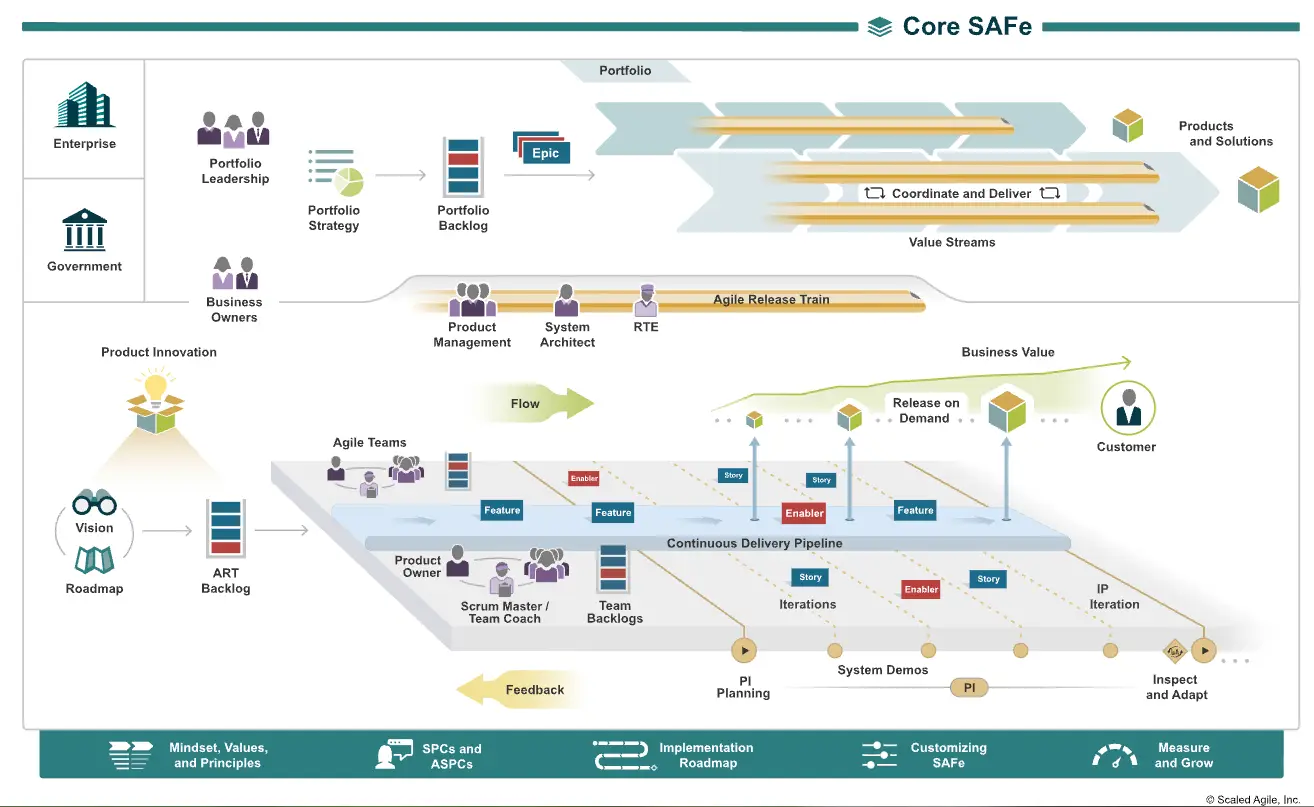
Six Main Themes in SAFe 6.0
- Stronger business agility: Connect strategy, value streams, leadership, and team work.
- Clearer team responsibilities: Explain the work of Agile Teams, Product Owners, Scrum Masters or Team Coaches, and other roles.
- Faster value flow: Use eight flow accelerators, WIP limits, Kanban, and value stream management to reduce delays.
- Agility across the business: Apply Lean and Agile ideas outside IT, such as in finance, marketing, HR, legal, and operations.
- AI, Big Data, and Cloud: Give guidance for using these technologies in products and value streams.
- Better outcomes: Use Measure and Grow and optional OKRs to connect work with measurable results.
SAFe Studio
SAFe Studio is Scaled Agile's online platform for learning and using SAFe. It includes courses, role-based learning, assessments, planning tools, practice resources, certification management, and a professional community.
Access normally comes from one of these paths:
- joining an approved SAFe course;
- buying individual Studio access; or
- joining an organization with a SAFe Enterprise subscription.
References
Blackboard PPT
All tool names in the comparison tables link to their official pricing or plan pages.