Module - 5 Empathize Users
2026-09-21 13:06
Tags: #desgin
Author: Duke Hsu
Topic
- Empathize with Users
- Apply Methods
- Build Empathy Map
- User Personas Definition
1. Definition of Empathize
Empathize means stepping into the shoes of the people you are designing for deeply understanding their needs, thoughts, emotions, pain points, and motivations . So the IT solution you create truly solves their real problems.
How?
- Observe - Watch how users behave in real contexts.
- Engage - Talk and listen without judgment
- Immerse - Experience what users experience
1.1 Why Empathize Matters in IT Solutions
- Avoid Assumptions
- Discover Real Pain Points
- Build Solutions People Actually Use
- Guide Every Later Stage
Other:
- Remove bias
- Finds hidden needs
- Drives innovation
2. Empathizing Methods
We use : - Ask the Right Questions - Interview - Assuming a Beginner's Mindset
Nine Method
- Assuming a Beginner's Mindset
- Ask the Right Questions
- Photo & Video User Studies
- Personal Photo & Video Journals
- Interview
- Engaging with Extreme Users
- Analogous Empathy
- Sharing Inspiring Stories
- Bodystorming
2.1 Assuming a Beginner's Mindset
Approach the problem as if you know nothing. Drop your expertise, biases, and "I already know how this works." attitude. Look at the user's world with fresh, curious eyes.
a. Suspend Judgment
Do not label behaviors as "wrong " or "inefficient". Just notice
b. Ask "Why?" Often
Even simple actions can reveal deep motivations when you dig deeper.
c. Stay Curious
Treat every observation as a potential insight, not confirmation of your idea.
d. Document First
Write or record before interpreting so raw data stays pure.
2.2 Ask the Right Questions
Good question unlock stories. Poor questions get short, surface answers.
a. Open & Empathetic - Good questions
- Tell me about the last time you ..
- What was going through your mind?
- How did that make you feel ?
- What would make this easier?
- Walk me through your process....
b. Closed or Leading - Poor questions
- Do you like this feature?
- Wouldn't it be better if.....?
- Is this hard to use?
- Don't you think X is better?
- Yes / No only questions .
2.3 Photo & Video Studies and Journals.
Photo & Video User Studies. (digital world) - Reveals actual behavior vs self-reported - Captures context(noise, interruptions, tools) - Great for task analysis and usability
Personal Photo and Video Journals
- Shows long-term patterns and emotions
- Users reflect on their own journey
- Useful for lifestyle and habit insights
2.4 Interview
A structured or semi-structured conversation that explores the user's goals, frustrations, workarounds, and emotional journey with a product or problem space.
a. Prepare
- Define goals
- Draft open questions
- Get consent
b.Build Rapport
- Good conversation
- Make the person feel safe
- Start light
c. Dive Deep
- Follow interesting threads
- Ask for stories
d. Capture & Reflect
- Record (with permission)
- Take notes debrief
2.5 Extreme Users and Analogous Empathy
a. Engaging with Extreme Users
- Extreme needs reveal opportunities that average users hide
- Solutions for extremes often help the middle
- Surfaces edge cases early
b. Analogous Empathy
- Designing a hospital check-in? Study airport boarding or hotel check-in?
- Mobile banking frustration? Observe how people handle cash in markets
- Inspiration from unrelated fields sparks innovation
2.6 Sharing Stories and Bodystorming
a. Sharing Inspiring Stories
Tips
Create a "Story wall" or short video clips of key moments.
Collect and retell powerful user stories within the team
- Stories stick better than statistics
- They build shared emotional understanding
- They keep the real human at the center of every design decision
b. Bodystorming
Physically act out the user's experience - role play scenarios, use props, or simulate environments.
- Forces you to feel physical and emotional friction
- Reveals awkward steps that pure discussion misses
- Especially useful for mobile apps, service design, and multi-step flows (like login > register > home)
3. Empathy Map - Definition
An Empathy Map is a collaborative visualization tool that captures what a user Says, Thinks, Does, and Feels. It turns scattered observations into a shared, structured understanding of the person you are designing for .
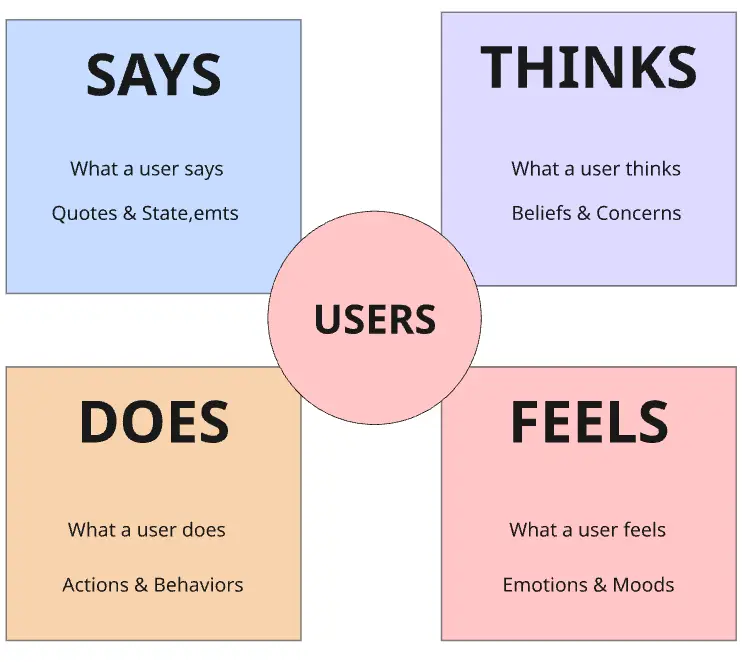
3.1 How to Create an Empathy Map
- Gather Insights. - Interviews, observations, journals, and photos you collected.
- Draw the Grid - Four quadrants. Put a user sketch in the center.
- Fill Each Section - Write sticky notes or short phrases. Include real quotes when possible.
- Synthesize - Look for patterns, contradictions, and surprising insights. Cluster similar notes.
- Share & Iterate - Discuss as a team . Update the map as you learn more about users.
4. User Personas Definition
A User Persona is a realistic, research-based fictional character that represents a key segment of your target users. It summarizes, behaviors, needs, frustrations, and context so the whole team can design with a specific human in mind.
Based on user personas, the team can more easily understand what clients or users need and what they want.
- Identity - Name, Role, age, photo , short bio
- Goals - What they want to achieve
- Frustrations - Pain points and obstacles
- Behaviors - How they currently solve problems
- Needs - Functional & emotional needs
- Quote - A memorable statement that captures their voice
4.1 Building Effective User Personas
- Start from Real Data
- Focus on Behavior, Not Demographics Alone
- Keep 2-4 Primary Personas
- Make Them Memorable
- Use Throughout the Project
References
Module 5 PPT