Module - 6 Secure Interactive Web Dev
2026-09-29 15:21
Tags: #ADET
Author: Duke Hsu
Topic
- Sessions / Cookies
- Authentication
- Password Security
- Validation / Sanitization
- Secure Coding
- REST APIs
1. Sessions and Cookies
1.1 Cookies
Cookies is a small data stored in the user's browser. - Stored on the client side - Can persist after browser closes. - Used for preferences and tracking - Sent with every request to the server
1.2 Sessions
Sessions is data stored on the server
- Stored on the server side
- More secure for sensitive data
- Usually expires when browser closes
- Identified by a session ID cookie
1.3 Why Sessions Matter
User Login - Keep the user logged in while browsing different pages
Shopping Cart - Remember items added to cart across pages
User Preferences - Store temporary settings during a visit
Security - Store sensitive data on the server, not in the browser
2. Authentication
Authentication is the process of verifying a user's identify - usually through a username / email and password - before granting access to protected resources.
2.1 User Submits Credentials
- Username and password via login form
2.2 Server Verifies Data
- Checks credentials against the database
2.3 Create Session
- Store user info in session if valid
2.4. Grant Access
- Allow access to protected pages
3. Password Security
Never store passwords in plain text, Always hash passwords before saving them to the database
3.1. Hashing
- Covert password into an unreadable string using algorithms like bcrypt
3.2 password_hash()
- PHP function to securely hash passwords
1 2 3 4 5 6 7 | |
3.3 password_verify()
- PHP function to check if a password matches the hash
1 2 3 4 5 6 7 8 9 10 | |
4. Validation and Sanitization
4.1 Validation
Checking if input meets rules
Example: - Email format is correct - Required fields are not empty - Password meets length rules - Age is a valid number
Purpose: Reject bad or incomplete data.
4.2 Sanitization
Cleaning input to make it safe
Example: - Remove unwanted characters - Escape HTML special characters - Trim extra spaces - Convert data to proper type
Purpose: Prevent XSS and injection
4.3 Common Web Attacks to Prevent
SQL Injection - Attacker inserts malicious SQL through input fields. Prevent with prepared statements.
XSS (Cross-Site Scripting) - Attacker injects JavaScript into pages. Prevent by escaping output(htmlspecialchars)
CSRF - Forces a logged-in user to perform unwanted actions. Prevent with CSRF tokens.
Brute Force - Repeated login attempts to guess passwords. Prevent with rate limiting and strong passwords.
5. Secure Coding Practices
Secure coding practices are guidelines and techniques used by web developers to write code that is resistant to security vulnerabilities and cyber attacks.
- Input Validation
- Output Encoding
- Parameterized Queries
- Authentication and Session Management
- Principle of Least Privilege
- Secure Secrets Management
- Proper Error Handling and Logging
- Transport Layer Protection
5.1 Why It Matters
- Early Prevention
- Risk Reduction
- Industry Standards
6. REST API

A REST API is a way for different systems to communicate over the web using standard HTTP methods. It allows applications to exchange data in a structured format (usually JSON)
6.1 Common Methods
| Method | Definition | Idempotent | Safe | HTTP Status Code |
|---|---|---|---|---|
| GET | 獲取資源數據 / Retrieve Data | Yes | Yes | 200 (OK), 404 (Not Found) |
| POST | 建立新資源 / Create new data | No | No | 201 (Created), 422 (Unprocessable) |
| PUT | 完整替換/覆蓋現有資源 / Update data | Yes | No | 200 (OK), 400 (Bad Request) |
| PATCH | 部分修改現有資源屬性 / Update data | No | No | 200 (OK), 400 (Bad Request) |
| DELETE | 移除指定的資源 / Remove data | Yes | No | 200 (OK) or 204 (No Content) |
| Example: |
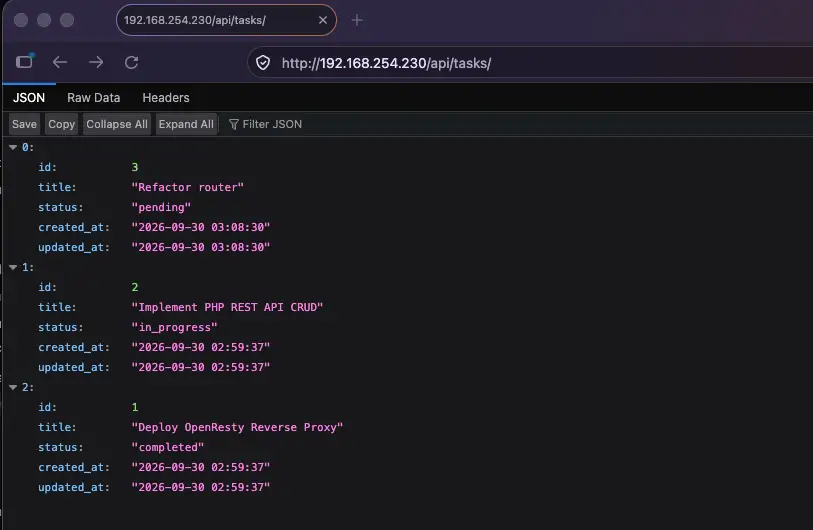
- GET
curl -X GET http://localhost/api/tasks -
POST
1
2
3
curl -X POST http://192.168.254.230/api/tasks \ -H "Content-Type: application/json" \ -d '{"title": "Refactor router", "status": "pending"}' -
PUT
1
2
3
curl -X PUT http://192.168.254.230/api/tasks/1 \ -H "Content-Type: application/json" \ -d '{"title": "Deploy OpenResty Reverse Proxy", "status": "completed"}' -
PATCH
1
2
3
curl -X PATCH http://192.168.254.230/api/tasks/2 \ -H "Content-Type: application/json" \ -d '{"status": "completed"}' -
DELETE
1curl -X DELETE http://192.168.254.230/api/tasks/1
References
https://owasp.github.io/www-project-secure-coding-practices-quick-reference-guide/#div-main